


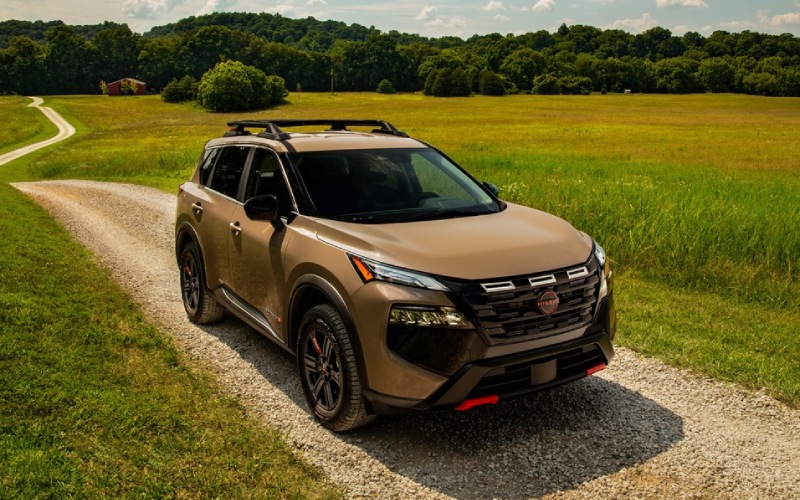
Mears Nissan - Which 2026 Nissan Rogue trims have wireless Apple CarPlay near Akron, OH?
If you are comparing compact SUVs and want a cable-free smartphone experience for your drives between downtown Akron, Highland Square, and Cuyahoga Falls, it helps to know exactly which 2026 Nissan Rogue models deliver wireless Apple CarPlay® and wireless Android Auto™. At Mears Nissan, we hear this question often from shoppers who juggle short hops around the University of Akron with longer I-77 and SR-8 commutes. Here is a clear, Akron-ready guide to how each Rogue trim handles smartphone integration, plus tips to make the most of your tech on day one.
The fast answer — Rogue trims and smartphone integration, side by side
To keep your research simple, start with the equipment differences among Rogue trims. Every 2026 Rogue supports Apple CarPlay® and Android Auto™; wireless capability is trim dependent, and the available connected features step up as you move through the lineup.
- S: Apple CarPlay® and Android Auto™ via USB (wired) on an 8-inch NissanConnect® touch-screen; Bluetooth® audio and calls.
- SV: Apple CarPlay® and Android Auto™ via USB (wired) on an 8-inch NissanConnect® touch-screen; adds NissanConnect® with Wi-Fi Hotspot.
- Rock Creek®: Apple CarPlay® and Android Auto™ via USB (wired) on an 8-inch NissanConnect® touch-screen; optional wireless charging with Rock Creek® Premium Package.
- Platinum: Wireless Apple CarPlay® and wireless Android Auto™ on a 12.3-inch NissanConnect® touch-screen, plus Google built-in with Google Assistant and Google Maps™, Bose® Premium Audio System, and NissanConnect® with Wi-Fi Hotspot.
If you want the truly wire-free experience — the kind where you keep your phone in your pocket as you back out of a West Market Street spot and your playlists, texts, and navigation just appear — the Rogue Platinum is your match. If you prefer to plug in, S, SV, and Rock Creek® offer the same core Apple CarPlay® and Android Auto™ functions using a USB cable.
Why wireless can be a daily upgrade around Akron
Akron driving involves a lot of quick transitions — dropping off at Canal Park, slipping into a garage near Main Street, or darting between errands in Merriman Valley. Wireless Apple CarPlay® and Android Auto™ remove the setup friction for these short, frequent trips. Your compatible smartphone connects automatically, your maps pick up where you left off, and voice control stays one press away.
The Rogue Platinum’s wireless experience also pairs naturally with its available Google built-in. With Google Assistant, you can say “Hey Google, navigate to the Northside Marketplace” or “Set the cabin to 70 degrees” and keep your hands on the wheel. For longer runs down I-77 or I-76, NissanConnect® with Wi-Fi Hotspot supports passengers who want to stream, study, or hop on video calls.
How to connect — first-drive setup tips for Apple and Android
Whether you select a wireless-capable Platinum or a plug-in setup on S, SV, or Rock Creek®, pairing takes just a few minutes. Here is a quick walkthrough so you are ready before your first test drive.
- Start your Rogue and unlock your phone. Ensure Bluetooth® and Wi-Fi are enabled on your device.
- On the center display, open the smartphone connection menu and select Add Device or Connect New Device.
- On your phone, select your Rogue when it appears in the Bluetooth® list and confirm the pairing code on both screens.
- If you drive a Rogue Platinum: accept the on-screen prompts to enable wireless Apple CarPlay® or wireless Android Auto™. If you drive S, SV, or Rock Creek®, plug in your compatible phone with a quality USB cable and accept the prompts.
- Allow contacts, messages, and map permissions if you want full voice control and messaging features.
- Optional but helpful: set your phone as the priority device in the vehicle’s Bluetooth® settings if multiple drivers share the Rogue.
Pro tip from our delivery team: if you are pairing in our showroom, bring your primary USB cable (for wired setups) and your app logins. It is much faster to complete permissions and updates while parked at our dealership than on your first morning commute to downtown Akron.
No Platinum? Easy ways to elevate your experience
If you prefer the value and features of S, SV, or Rock Creek®, you will still enjoy full Apple CarPlay® and Android Auto™ functionality with a simple USB connection. There are also smart add-ons and built-in features that make daily life easier without going all the way to Platinum.
- Choose quality cables: A high-quality, data-certified USB cable improves connection stability and reduces the chance of disconnects when you hit rougher pavement on East Market Street.
- Add wireless charging (Rock Creek®): The Rock Creek® Premium Package includes wireless charging, which helps keep your phone powered on those plug-in CarPlay/Android Auto days.
- Use NissanConnect® features: With NissanConnect® Services through the MyNISSAN app, remote features like Remote Engine Start and Remote Vehicle Status pair nicely with your daily routine, from preconditioning the cabin before a Route 8 commute to checking Miles to Empty after a grocery run.
- Leverage safety tech: While you are navigating with your favorite app, standard Nissan Safety Shield® 360 adds confidence with features like Blind Spot Warning and Rear Cross Traffic Alert — a big help when backing out near busy storefronts or parallel-parking near the university.
Bottom line — wired integration on S, SV, and Rock Creek® mirrors the on-screen CarPlay and Android Auto experience you expect. If “no cable, ever” is the goal, the Platinum is the right choice.
Beyond smartphone mirroring — Platinum tech highlights
The Rogue Platinum layers in more than wireless mirroring. The expansive 12.3-inch NissanConnect® touch-screen and 12.3-inch digital dashboard bring a premium feel to your cockpit. Google built-in lets you download apps from Google Play, use Google Maps™ natively, and talk to Google Assistant without picking up your phone. Pair that with the Bose® Premium Audio System and a crisp Head-Up Display, and your morning drive from Akron to Fairlawn gains an easy, intuitive flow — directions, calls, and alerts are all right where you want them.
For those who split time between city streets and open roads, available ProPILOT Assist helps reduce highway fatigue by assisting with steering, braking, and acceleration in your lane. It is a natural complement to your wireless maps and media on longer drives south toward Canton or north toward Cleveland.
Real-world ownership notes our Akron shoppers ask about
Here are a few practical considerations we discuss with customers who prioritize connectivity.
- Phone compatibility: Wireless Apple CarPlay® and wireless Android Auto™ require a compatible smartphone. Most recent iPhone® and Android™ devices work seamlessly; bring yours to Mears Nissan and we will help you test it in-vehicle.
- Data usage: CarPlay and Android Auto™ use your phone’s data for music and navigation. NissanConnect® Wi-Fi Hotspot is separate and can support passenger devices after the trial period with a paid plan.
- Updates and stability: Keep your phone’s OS up to date for the best wireless experience. If you notice occasional drops, deleting and re-pairing your device typically resolves it in under a minute.
- Charging strategy: Wireless mirroring draws battery; consider wireless charging (Rock Creek® package) or a quality USB-C cable to maintain charge, especially on longer I-77 stretches.
If you want to see, touch, and compare, our showroom in Canton is an easy hop from Akron. We will place you in both an 8-inch and a 12.3-inch system so you can decide whether wired or wireless fits your day-to-day best.
Why shop your Rogue with Mears Nissan
At Mears Nissan, our goal is to make the first week with your new Rogue as smooth as the 1.5L VC-Turbo® engine paired with the Xtronic CVT®. We will set up your smartphone, customize your driver profiles, demonstrate features like the 3D Around View® Monitor with Invisible Hood View, and walk you through NissanConnect® Services on the MyNISSAN app. If you choose Intelligent All-Wheel Drive, we will also show you how to select Auto, Eco, Sport, Snow, or Off-Road Modes so you are confident on everything from Merriman Road to the Towpath trailheads.
When it is time for service, our factory-trained technicians, loaner vehicles, and free Wi-Fi make visits convenient. We are here to support your ownership with Genuine Nissan parts, thoughtful tech help, and a team that knows the Rogue inside and out.
Ready to experience the difference between wired and wireless for yourself? Contact our team, and we will line up a back-to-back drive in the 2026 Rogue trims that fit your needs — then help you pair your phone so the drive back to Akron feels like home.
Frequently Asked Questions:
Do wireless Apple CarPlay® and wireless Android Auto™ require a paid subscription?
No. Wireless Apple CarPlay® and wireless Android Auto™ on the Rogue Platinum do not require a subscription. They use your phone’s data plan. NissanConnect® Wi-Fi Hotspot and certain NissanConnect® Services features have trial periods and may require a paid plan after the trial.
Can multiple phones be paired, and how does the Rogue decide which one connects?
Yes, you can pair multiple devices. In the Bluetooth® settings, you can set a priority device. When you start the Rogue, it will connect to the last active or the priority phone if both are present.
If I do not choose the Platinum, can I add wireless mirroring later?
Rogue S, SV, and Rock Creek® support Apple CarPlay® and Android Auto™ via USB from the factory. Third-party wireless adapters exist, but performance varies. For the best integrated, supported wireless experience, we recommend the Rogue Platinum. Our team can demo both approaches so you can decide.
Which navigation option is best — my phone’s maps or the Rogue’s built-in Google Maps™?
Both work well. With wireless mirroring, many drivers stick to their familiar phone app. On the Rogue Platinum, Google Maps™ is integrated with Google built-in, so you get native navigation without a phone connected and can use Google Assistant for voice commands. Try both during your test drive to see which you prefer.